2026 How to Use Wifi Walkie Talkie for Improved Communication?
In the fast-paced world of communication, the Wifi Walkie Talkie emerges as a game-changer. This innovative device provides instant connectivity that traditional walkie-talkies cannot match. Imagine attending a bustling trade fair like the 2026 Canton Fair. Here, over a million square meters of exhibition space can overwhelm any attendee. The Wifi Walkie Talkie allows seamless communication among team members, enhancing coordination.
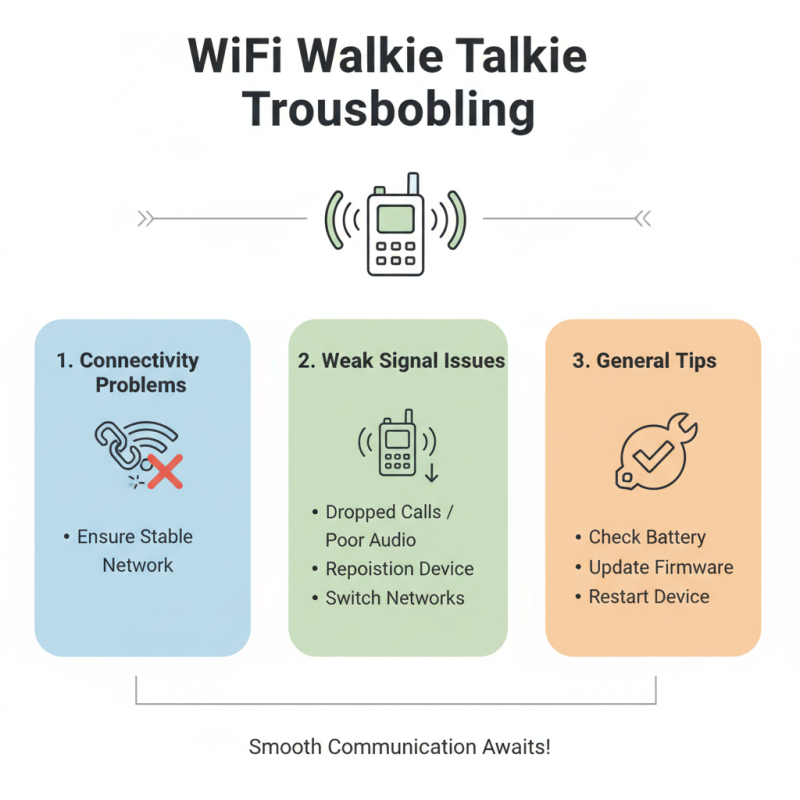
Picture a scenario where you need to locate an AI-certified supplier amid a sea of booths. You can easily notify your colleague on the other end using a Wifi Walkie Talkie. This real-time connection minimizes confusion and saves precious time. However, there can be challenges. Not all areas might have a robust Wifi signal, leading to occasional dropouts.
Effective use of this tool requires understanding its capabilities and limitations. You may find that battery life may not last an entire day of heavy usage. Hence, finding opportunities to recharge is crucial. Embracing Wifi Walkie Talkie for improved communication is not just about convenience; it’s also about adapting to new technology. Balancing between reliable communication and potential drawbacks is essential for success in any event.

Understanding Wifi Walkie Talkies and Their Functionality
Wifi walkie talkies are innovative tools designed for seamless communication. They utilize Wi-Fi networks to connect users across various distances. Unlike traditional walkie talkies, they don't rely on radio frequencies. This makes them ideal for urban settings or large buildings.
Their functionality is straightforward. Users simply connect the walkie talkie to a Wi-Fi network. Once connected, they can communicate instantly with others who are also connected. This is particularly useful in workplaces or during events. However, not everyone may have access to reliable Wi-Fi in every location. This limitation can cause interruptions in communication.
Despite their advantages, there are challenges. Wifi walkie talkies may not always deliver clear audio. Network congestion can affect call quality. Additionally, they require charging, unlike battery-powered models. Users need to consider these factors when choosing the right communication tool. It’s essential to weigh the pros and cons carefully. A balance between convenience and reliability is crucial for effective communication.
Benefits of Using Wifi Walkie Talkies for Communication
Wifi walkie talkies have transformed communication, especially in challenging environments. They operate over Wi-Fi networks, providing greater range than traditional walkie-talkies. Users can connect multiple devices seamlessly. This capability enhances coordination during events and team activities. It allows for instant communication without the limitations of distance.
One major benefit is that they can be used indoors and outdoors. The quality of sound is often clearer than radio systems. This clarity reduces misunderstandings in urgent situations. However, the reliance on Wi-Fi can be a downside. If the network goes down, communication stops. Users must ensure strong, stable connections, which isn't always easy.
Moreover, these devices often have features like group messaging. This allows messages to be sent to multiple users at once. Yet, navigating these features can be complex. Many users find the interface challenging and need time to learn. Overall, Wi-Fi walkie talkies offer significant advantages but come with their own set of hurdles to overcome.
Benefits of Using Wifi Walkie Talkies for Communication
This chart illustrates the various benefits of using Wifi walkie-talkies for improved communication. As seen, features like audio clarity, range, and ease of use score high in terms of user satisfaction. These advantages make Wifi walkie-talkies an essential tool for effective communication in various settings.
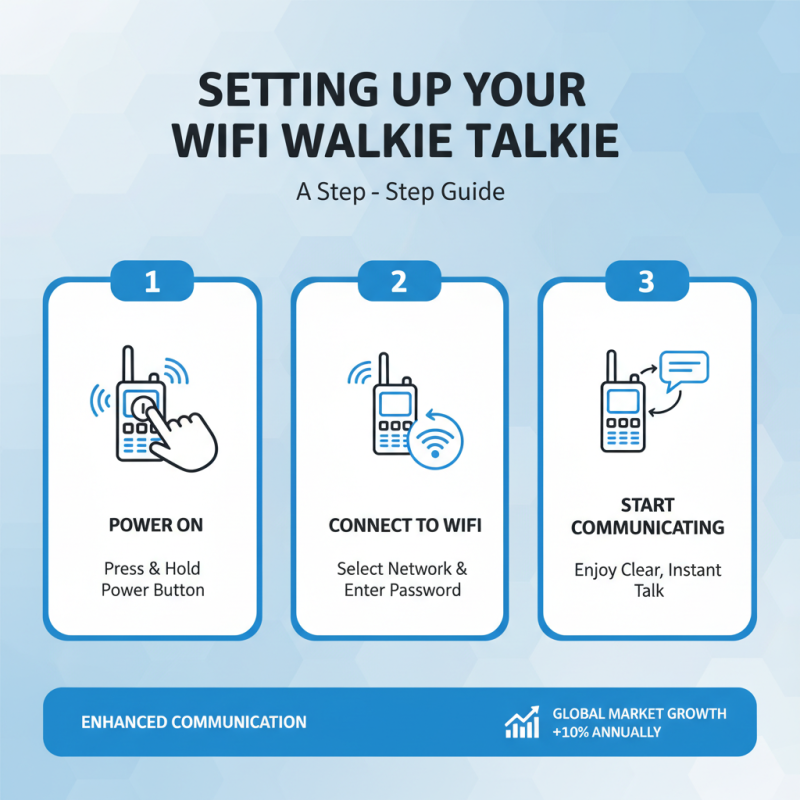
Setting Up Your Wifi Walkie Talkie: A Step-by-Step Guide
Setting up your WiFi walkie talkie can enhance communication significantly. This device allows users to connect over WiFi, enabling clearer voice quality and instant communication. According to industry reports, the global market for such devices is projected to grow by 10% annually. This growth reflects a rising need for efficient remote communication solutions.
Begin by ensuring a stable WiFi connection. Check the strength of your signal. A weak signal can lead to distorted audio or dropped connections. Connect your device to the network of your choice, making sure it aligns with your communication needs. Once connected, download the required app for configuration. This process may vary slightly depending on the provider.
After installation, test your device with a colleague or friend. This helps identify any potential issues before using it in critical situations. Be cautious, as user error can lead to miscommunication. Pay attention to your settings; an incorrect configuration could render the device ineffective. Regular testing and updates are essential to maintain functionality. Continuous improvement in these areas will enhance your overall experience.
Best Practices for Effective Communication with Wifi Walkie Talkies
Using Wifi walkie talkies can significantly enhance communication, especially in team settings. To get the most out of these devices, it’s crucial to follow best practices for effective communication.
Tips: Keep your messages short. This helps prevent misunderstandings. Use clear language and avoid jargon. Always confirm your message was received and understood.
Ensure your devices are charged. It’s frustrating when communication fails due to low battery. Regularly check your equipment in advance. During activities, keep the channels clear. If too many people speak at once, chaos happens.
Remember to choose a quiet location for important discussions. Background noise can drown out your voice. If you notice difficulties in communication, analyze the situation. Could you improve your signal strength? Are users properly trained? Reflecting on these aspects enhances overall communication effectiveness.