Leave Your Message

What Is a Walkie Talkie Set and How Does It Work?

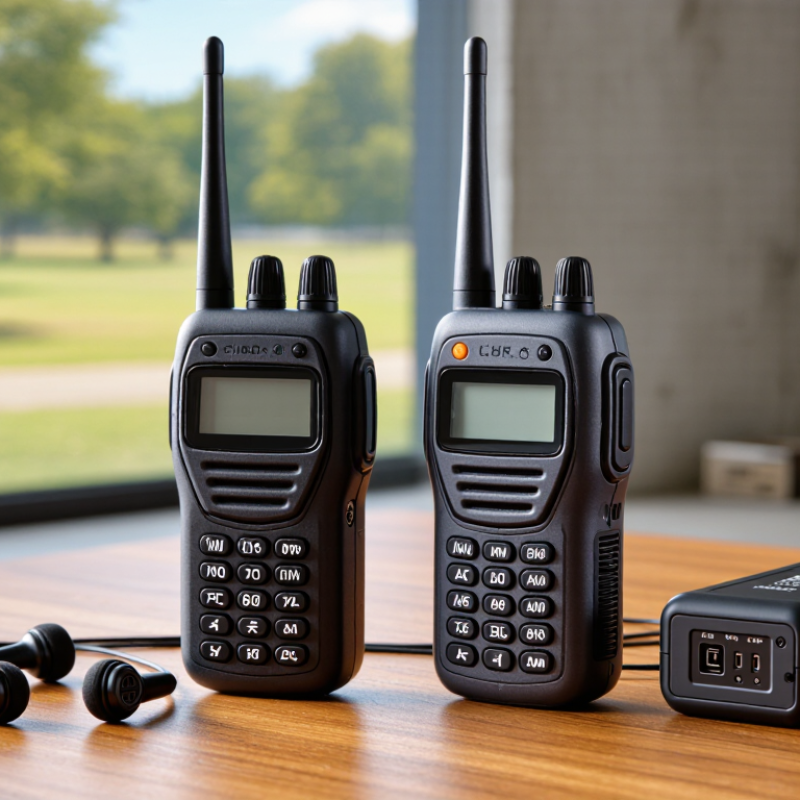
A Walkie Talkie Set is a pair or group of handheld radios that lets people communicate directly over radio waves. Unlike a mobile phone, it usually does not rely on a cellular network. Press the push-to-talk button, speak, then release it to listen. Simple. Most sets share a channel, so users on that channel may hear the same message. This makes short, coordinated conversations practical for hiking groups, event staff, or family outings.

Inside each radio, a microphone turns speech into an electronic signal. A transmitter sends that signal through the antenna, and another radio receives it and plays the sound through its speaker. The battery powers these parts, while channel controls help users choose compatible settings. Exact features vary by model, so check the manual before use. Some sets offer multiple channels or hands-free accessories, but those features do not guarantee private communication.

Range is often the part people misunderstand. A manufacturer’s distance estimate may assume open, unobstructed ground. In real settings, buildings, hills, trees, battery condition, and antenna design can weaken the signal. A message may sound clear in a park, then break up inside a concrete building. That is worth remembering. Good radio habits help: keep the antenna upright, speak clearly, and pause between transmissions. A Walkie Talkie Set is useful, but it is not magic; choosing one means matching its features to the terrain, group size, and task.
What Is a Walkie Talkie Set and How Does It Work?

What Is a Walkie-Talkie Set?

A walkie-talkie set is a group of handheld two-way radios, often supplied with batteries and a charger. Some sets include two radios; others contain more. Each radio combines a microphone, speaker, antenna, controls, and a push-to-talk button in one portable unit. Simple, but useful. The word “set” can be a little vague, so check how many radios and accessories are included.

Most walkie-talkies communicate over a selected channel. Pressing the button sends your voice, and releasing it lets you hear a reply. In many models, users take turns rather than speaking over one another. That small pause matters.

For example, a worker might press the button, say “Loading bay,” then release it and wait for confirmation. Radios need compatible channel settings to communicate.

Actual range varies with buildings, hills, trees, interference, and battery condition; a clear distance printed on packaging may not match everyday use. Thick walls can weaken a signal, too.

For dependable communication, test the radios in the places where they will be used, and keep spare batteries charged.
The Main Components of a Walkie-Talkie Set

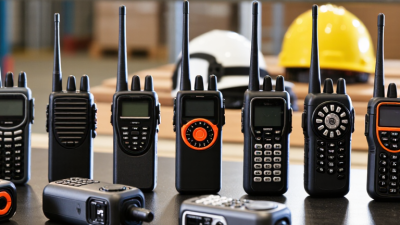
A walkie-talkie set usually contains two or more handheld radios, each built around a transceiver. This unit sends and receives radio signals. An antenna helps carry those signals between radios, while a microphone turns your voice into an electrical signal. The speaker converts incoming signals back into sound. Small parts matter.

The push-to-talk button controls when a radio transmits. Press and hold it while speaking, then release it to listen. Most handheld sets share a channel, so they cannot carry two conversations at once. A channel selector helps users choose the same frequency, and a volume control makes speech easier to hear over wind or machinery.

A rechargeable battery powers the radio; its contacts need to stay clean and secure. A belt clip, charger, or headset may also come with the set. In practice, walls, distance, and battery condition can reduce clarity, even when the controls seem correctly set.

Tips: Check that every radio uses the same channel, and test the set before leaving coverage. Hold the microphone a few inches from your mouth and speak clearly. If voices sound weak, inspect the battery and antenna connection before raising the volume.

How Walkie-Talkies Transmit and Receive Radio Signals

A walkie-talkie set sends voice through radio waves, then turns incoming waves back into sound. When you press the talk button, the microphone converts your voice into an electrical audio signal. The radio uses that signal to shape a carrier wave at the selected channel. Its antenna radiates the signal through the air. Not magic—just carefully controlled energy.

The other unit’s antenna picks up a small part of that energy. Its receiver selects the channel and filters out many unwanted signals. A circuit then extracts the audio, and the speaker reproduces it. You hear a slight hiss when reception is weak. With most simple sets, both radios share one channel, so only one person can transmit at a time. Release the button to listen. Terrain, walls, antenna position, battery condition, and nearby radio traffic can all affect clarity and usable distance. An open field may sound clear, while a concrete building can muffle a nearby voice. Signal behavior is less predictable than a neat diagram suggests.

What Is a Walkie-Talkie Set and How Does It Work?

Part or Stage What It Does When Transmitting When Receiving
Walkie-talkie set A portable two-way radio system, usually made up of two or more compatible handheld radios. One radio sends a voice message over radio waves. Another radio tuned to compatible settings can reproduce the message as sound.
Microphone Converts sound waves from the speaker’s voice into an electrical audio signal. The audio signal is prepared for transmission. Not used for incoming audio.
Push-to-talk (PTT) button Controls whether the radio is set to transmit or listen. Pressing and holding PTT typically activates the transmitter. Releasing PTT typically returns the radio to receive mode.
Transmitter Combines the audio information with a radio-frequency signal on the selected channel. Produces a modulated radio signal for the antenna to send. Inactive during ordinary reception.
Antenna Converts electrical radio-frequency energy into electromagnetic waves and back again. Radiates the signal into the surrounding area. Captures radio waves and delivers a small electrical signal to the receiver.
Radio channel Specifies the radio frequency or, on digital systems, a defined channel configuration. The transmitting radio sends using its selected channel settings. Radios need compatible channel settings to communicate. Privacy codes do not encrypt speech or make a channel exclusive.
Receiver Selects and processes the desired radio signal while reducing unwanted signals and noise. Inactive while the radio is transmitting in typical push-to-talk operation. Extracts the audio information from the received signal.
Speaker Converts the receiver’s electrical audio output back into audible sound. Usually silent while the radio is transmitting. Plays the other user’s voice.
Half-duplex communication Allows two-way communication, but normally only one radio on a shared channel transmits at a time. The user speaks while holding PTT; other users should listen. The user listens while not transmitting and replies after the other person releases PTT.
Direct mode and repeaters Radios may communicate directly, or a compatible system may use a repeater to retransmit signals. In direct mode, a radio sends to another radio without an intermediate relay. With a repeater, it sends to the repeater first. In direct mode, the receiving radio picks up the other radio’s signal. With a repeater, it receives the retransmitted signal.
Range and signal conditions Usable range depends on factors such as antenna height, terrain, buildings, interference, frequency, and radio power. Obstructions and distance can weaken the transmitted signal. A weak or obstructed signal may sound noisy, intermittent, or may not be received.

Note: Frequency bands, channel plans, power limits, and licensing rules vary by country and radio type. Check local regulations and the radio’s operating instructions before use.

How to Communicate Using a Walkie-Talkie

To communicate with a walkie-talkie, make sure both radios are on the same channel and within practical range. Hold the radio upright, with its antenna pointing upward. Press and hold the push-to-talk button, then wait a brief moment before speaking. This pause helps prevent the beginning of your message from being clipped.

Speak clearly, using a steady voice and short phrases. Say who you are calling, then identify yourself: “Camp gate, this is the trail group. We’re turning back.” Release the button when you finish. The radio switches back to listening mode, so avoid holding the button while waiting for a reply. Keep messages brief. Others may need the channel.

Listen before transmitting, especially when several people share a channel. If your message is unclear, ask for a repeat rather than guessing. Not every radio works perfectly around hills, thick walls, or heavy interference; move to a more open spot if reception falters. I still sometimes speak too quickly when weather turns bad. A calm second attempt usually works better. Check the battery and volume before leaving, and agree on simple call names with your group.

Factors That Affect Walkie-Talkie Range and Performance

Walkie-talkie range is not a fixed circle around the user. It changes with terrain, buildings, antenna position, battery condition, and radio interference. The ITU-R P.525-4 propagation recommendation describes free-space path loss using a 20-log relationship with distance and frequency. In ideal conditions, doubling distance adds about 6 dB of path loss. Real streets rarely behave like open space. Walls matter. So does height.

The ITU-R P.1812 recommendation models terrestrial radio paths using terrain and land-cover data, reflecting how hills and built-up areas can weaken signals. A concrete stairwell or metal-sided warehouse may block more signal than a clear park, even at a shorter distance. Holding the radio upright and keeping its antenna clear of the body can help; low batteries and crowded channels can also reduce usable performance. During a site test, compare calls from several locations, including behind walls and around corners. A range figure on packaging can still mislead. Treat it as a best-case clue, not a promise for your route.