Leave Your Message

Top Walkie Talkie Headsets for Clear Communication

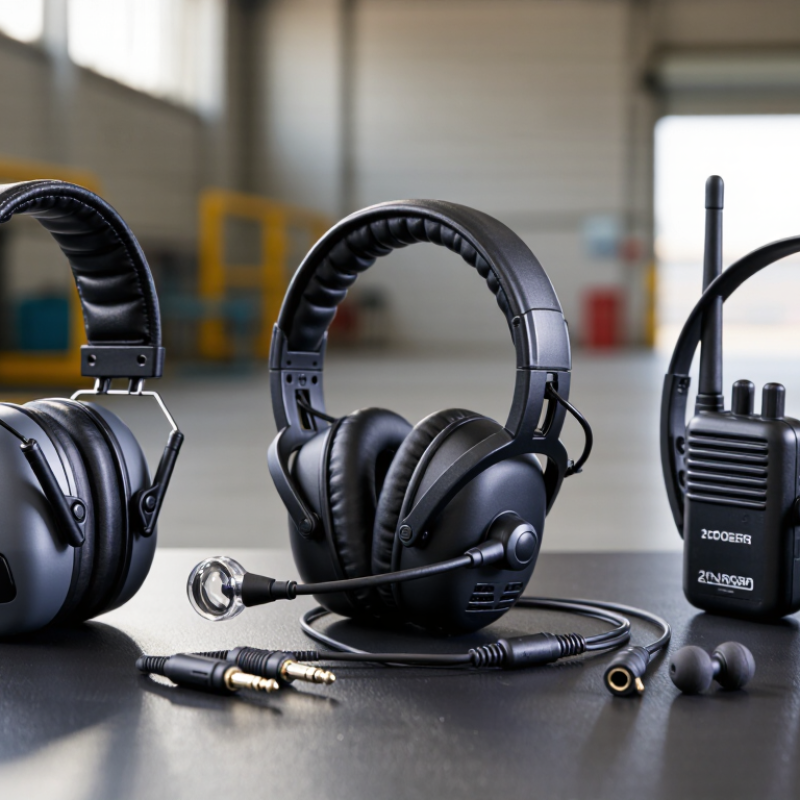
Choosing the right Walkie Talkie Headset is less about adding another accessory. It is about preserving clear speech when engines roar, doors slam, or wind cuts across an open site. A useful headset should fit securely, reduce distracting noise, and keep controls easy to reach. It should also match the radio model, connector type, and working environment.

“Clear communication begins with the complete system, not the headset alone,” says Mark O’Connell, a long-time two-way radio communications specialist. That principle deserves attention. A premium earpiece cannot repair a weak radio signal or a poorly adjusted microphone. Still, the right headset can make voices sharper and reduce repeated instructions. That matters during event coordination, warehouse operations, outdoor work, and emergency preparedness.

Fit comes first.

During real use, small details become obvious. A tight headband may cause pressure after several hours. A loose microphone may capture clothing noise instead of speech. Thick hearing protection can also change how an earpiece sits. These problems are easy to overlook in a product photograph.

This guide compares top Walkie Talkie Headset options through practical criteria, including microphone clarity, comfort, durability, hearing protection, connection reliability, and value. Some models perform brilliantly in quiet rooms but struggle beside machinery. Others feel basic yet remain dependable throughout a long shift. No headset is perfect. That is worth admitting.

The best choice depends on the user, radio, surroundings, and communication demands. Careful testing remains essential.
Top Walkie Talkie Headsets for Clear Communication

Types of Walkie Talkie Headsets and Their Communication Uses

Top Walkie Talkie Headsets for Clear Communication

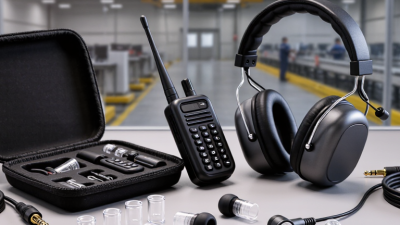
Walkie talkie headsets vary by workplace, noise level, and speaking distance. Over-ear headsets provide strong hearing protection in workshops and busy outdoor sites. Their padded cups reduce surrounding noise, but they may feel warm during long shifts. Lightweight earpieces suit retail teams, event staff, and indoor coordination. They are discreet and easy to wear. However, a loose ear tip can weaken speech clarity.

Throat microphone headsets detect vibrations from the user’s neck. They can help during windy activities or loud machinery work. Speech may sound less natural, so users need practice with the push-to-talk button. Bone-conduction headsets leave the ears open, helping workers hear alarms and nearby instructions. They often work well for cycling teams, guides, and warehouse coordination. Fit remains critical. Small adjustments can make a surprising difference.

For clear communication, match the headset to the environment rather than choosing by appearance. Check connector compatibility, microphone placement, cable strength, and voice volume before regular use. In practical testing, speaking slightly slower often improves understanding more than increasing volume. Clean shared earpieces after each shift, and inspect cables for damage. No headset performs perfectly in every setting. I would also test it with gloves, helmets, or protective eyewear, because comfort problems are easy to overlook. Teams should review unclear messages and adjust their habits, not blame the equipment immediately.
Top Walkie Talkie Headsets for Clear Communication

Types of Walkie Talkie Headsets and Their Communication Uses

This comparison uses a practical suitability rating from 1 to 5, based on common headset characteristics such as speech clarity, noise isolation, hands-free operation, comfort during extended use, and awareness of surrounding sounds. Over-ear headsets are generally strongest in noisy environments, while bone-conduction models preserve awareness of nearby sounds.

Key Features That Improve Audio Clarity and Comfort

Top walkie talkie headsets should make speech clearer without creating pressure around the ears. In busy warehouses, road crews, and outdoor events, background noise can quickly cover short radio messages. A noise reducing microphone helps by placing the voice close to the mouth. A flexible boom also keeps the microphone position stable while the user moves. Clear speech matters.

A reliable headset should separate incoming audio from surrounding sounds. Some models use directional microphones and padded ear cups to reduce unwanted noise. Others use single-ear designs, which let users hear nearby warnings and conversations. Push-to-talk controls should be easy to find by touch, even when wearing gloves. Small details affect response time.

Comfort depends on more than soft padding. Adjustable headbands, lightweight frames, and breathable cushions help during long shifts. The cable should stay secure without pulling on the radio. I once tested a headset that sounded excellent but became uncomfortable after two hours. That result changed my view of “premium” performance. Audio quality alone is not enough. Fit must remain steady when users turn, bend, or walk quickly.

Before choosing, test the headset in the actual working environment. Try quiet speech, loud machinery, and several wearing positions. Check whether the microphone stays near the mouth. Also inspect the connector, controls, and ear seal for loose movement. A short trial can reveal problems that product descriptions miss.

Top Walkie Talkie Headsets for Clear Communication - Key Features That Improve Audio Clarity and Comfort

Headset Profile Best Use Case Microphone Design Noise-Control Method Typical Weight Typical Cable Length Comfort Features Common Durability Rating
Lightweight Single-Wire Earpiece Retail, hospitality, event staff, and routine indoor communication Inline omnidirectional microphone with push-to-talk control Basic voice isolation; best in low-to-moderate background noise Approximately 20–40 g Approximately 0.9–1.2 m Soft silicone ear tip, low-profile design, lightweight cable Usually IPX2–IPX4 for sweat or light splash resistance
Behind-the-Ear D-Shaped Earpiece Security, venue operations, warehouses, and extended shifts Boom or inline microphone positioned close to the mouth Improved microphone placement reduces handling and clothing noise Approximately 25–55 g Approximately 0.9–1.5 m Flexible ear loop, replaceable ear tips, balanced left/right fit Usually IPX3–IPX5, depending on connector and enclosure
Acoustic-Tube Covert Earpiece Front-desk security, hospitality, theaters, and discreet communication Remote microphone with a transparent acoustic tube for received audio Tube directs audio into the ear and limits sound leakage to nearby people Approximately 20–45 g Approximately 0.9–1.2 m Replaceable acoustic tube, soft ear tip, discreet profile Commonly splash-resistant at the earpiece; connector protection varies
Over-Ear Headset with Boom Mic Construction, traffic control, manufacturing, and loud work areas Directional boom microphone placed near the mouth Sealed ear cups provide passive attenuation; directional mic rejects side noise Approximately 150–280 g Approximately 1.0–1.5 m Padded headband, cushioned ear cups, adjustable boom, over-ear seal Often IPX4 or higher on ruggedized models
Bone-Conduction Communication Headset Cycling, outdoor teams, search operations, and situations requiring open ears Boom microphone combined with vibration transducers near the cheekbones Keeps ear canals open so users can hear surrounding sounds Approximately 35–90 g Approximately 0.8–1.2 m Open-ear fit, low pressure around the ears, adjustable frame Frequently IPX4–IPX6 for outdoor and sweat exposure
Heavy-Duty Ear Defender Headset Industrial sites, airports, motorsport, and high-noise environments Noise-canceling boom microphone designed for close speech pickup Large sealed ear cups and acoustic insulation; attenuation varies by model Approximately 250–450 g Approximately 1.0–1.8 m Wide padded headband, deep cushions, adjustable ear-cup pressure Commonly IPX4–IPX6 with reinforced connectors
Data note: Weight, cable length, and ingress-protection values are typical ranges for these headset categories. Actual specifications vary by connector type, radio compatibility, enclosure design, and manufacturer testing.

Compatibility, Connection Methods, and Device Requirements

Top Walkie Talkie Headsets for Clear Communication

A clear headset starts with compatibility, not appearance. Check the radio’s connector size, pin layout, and push-to-talk requirements. A 3.5 mm plug does not guarantee a correct match. Some radios use different wiring, even with identical sockets. The headset should also support the radio’s audio profile and microphone sensitivity. Otherwise, voices may sound distant, sharp, or muffled. Test the headset before outdoor work. My first fitting test once passed physically but failed during transmission. That mistake changed how I check equipment.

Connection methods affect reliability. Wired headsets usually offer immediate audio and no pairing delay. They work well in busy areas, where wireless signals may become inconvenient. Wireless models need Bluetooth support, stable pairing, and enough battery life for the full shift. Some also require a separate push-to-talk button or adapter. Confirm whether the radio supports wireless audio directly. If not, the headset may need a compatible bridge device. It can become awkward.

Tips: Match the headset with the exact radio model and connector type. Test receive audio, microphone clarity, and push-to-talk response separately. Check the cable near the plug for bending damage. For wireless use, charge both devices fully and test them behind walls. Keep a wired backup nearby. Small oversights often create the loudest problems.

How to Compare Headset Performance in Different Environments

Top Walkie Talkie Headsets for Clear Communication

How to Compare Headset Performance in Different Environments

A good walkie talkie headset should match its working environment, not just its advertised features. In a quiet office, clear speech and comfortable ear cushions may matter most. On a construction site, background noise, dust, and sudden machinery sounds change the test. I listen for clipped words, delayed audio, and whether the microphone captures speech under a helmet. Small details reveal real performance.

Outdoor testing needs more patience. Wind can overwhelm a weak microphone, while rain may affect controls and connectors. I compare the same headset during calm weather, light traffic, and steady movement. A secure earpiece should remain stable when the user turns quickly. It should also avoid painful pressure after several hours. Comfort is easy to overlook.

Very important.

Performance also depends on the radio, cable, connector, and user position. A headset cannot create extra transmission range. It can only improve how speech reaches the microphone and the listener. For reliable comparisons, use identical radios, equal volume settings, and repeated voice checks. Record results from both sides of the conversation. My own testing is not perfect; ear shape, speaking habits, and noise levels can distort impressions. That limitation deserves honest attention when choosing equipment for daily communication.

Safety, Durability, and Maintenance Considerations for Buyers

Top Walkie Talkie Headsets for Clear Communication

A reliable headset should protect hearing while keeping speech natural and understandable. In noisy workplaces, a cushioned earpiece can reduce distraction and listening fatigue. Choose adjustable headbands and soft contact points for long shifts. The microphone should sit close to the mouth without rubbing against clothing. Test voice clarity while walking, turning, and working near machinery. A headset that sounds clear indoors may perform poorly outdoors.

Durability matters when equipment faces dust, sweat, drops, and repeated cable movement. Look for sealed controls, flexible wiring, and strong strain relief near every connector. Check the earpiece before each shift for cracks, loose parts, or blocked microphone openings. During routine inspections, gently move the cable and listen for interruptions. Small faults often become communication failures later. I would not trust a headset only because it feels solid. Real use can expose weaknesses quickly. That is an easy point to overlook.

Tips: Wipe surfaces with a slightly damp cloth after use. Keep the microphone opening free of dust. Do not pull the headset by its cable. Store it flat, away from heat and moisture. Replace worn cushions promptly, even if audio still works. Test the headset with the radio before entering a busy or hazardous area. Rotate shared equipment carefully, and clean contact surfaces between users.